Measured comparison
upscaler.ir vs GPT Image
GPT Image is an image editor, not an upscaler. Asked to enlarge a photo, it redraws it: the result is sharp, but it is no longer quite the same photo.
Visual comparison


Drag the divider: one side is GPT Image 2.6, the other upscaler.ir Pro, both from the same small input.
The same spot, up close
Each crop is the same spot in every model's output. “Original” is what should have been recovered.
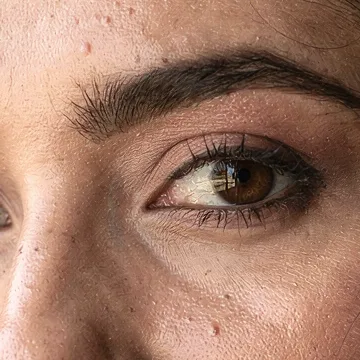 Original
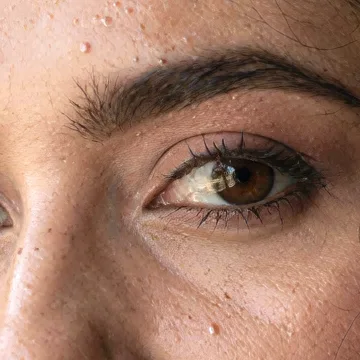 upscaler.ir Pro
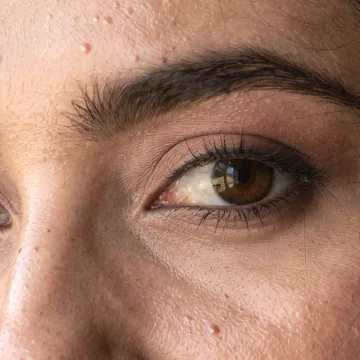 upscaler.ir Free
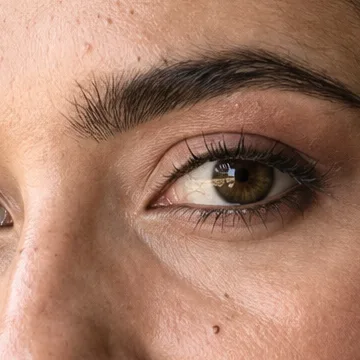 GPT Image 2.6
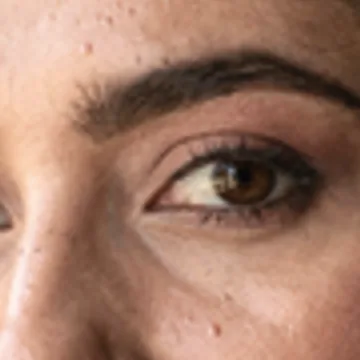 Plain resize
What we found
- On all three photos GPT Image drifted furthest from the original: the eye shape, the carpet threads and the leopard's fur were redrawn.
- upscaler.ir Pro restored detail in place and was two to three times faster (15–28 s vs 49–57 s).
- GPT Image tops out around 8 megapixels; upscaler.ir goes up to 64.
When to use GPT Image 2.6
For creating or changing an image (new background, adding something, restyling), GPT Image is a good tool.
When to use upscaler.ir
When you want the same photo, only bigger and sharper (family photos, products, print), use upscaler.ir.
Try a photo freeThe numbers
We had the original of every photo, so outputs could be measured against the truth, not taste.
| Photo | Model | Faithfulness (dB) | Detail | Time | Output size |
|---|---|---|---|---|---|
| Portrait | upscaler.ir Pro | 40.7 | 0.87 | 28 s | 1536×2048 |
| upscaler.ir Free | 38 | 0.89 | 14 s | 1536×2048 | |
| GPT Image 2.6 | 30.9 | 1.4 | 49 s | 1536×2048 | |
| Plain resize | 42.7 | 0.47 | — | 1536×2048 | |
| Snow leopard | upscaler.ir Pro | 30 | 0.76 | 26 s | 2048×1536 |
| upscaler.ir Free | 29.2 | 0.82 | 14 s | 2048×1536 | |
| GPT Image 2.6 | 23.4 | 1.14 | 52 s | 2048×1536 | |
| Plain resize | 32.4 | 0.43 | — | 2048×1536 | |
| Hand-knotted carpet | upscaler.ir Pro | 29.5 | 1 | 16 s | 2048×1536 |
| upscaler.ir Free | 29.4 | 0.99 | 14 s | 2048×1536 | |
| GPT Image 2.6 | 19.1 | 1.46 | 57 s | 2048×1536 | |
| Plain resize | 33.3 | 0.54 | — | 2048×1536 |
- Faithfulness (dB)
- We shrank each output back to the input size and compared it with the input (PSNR). Higher means the model kept the photo instead of moving or changing things.
- Detail
- Fine-detail energy relative to the original. 1 means as detailed as the real photo; lower is blurry; well above 1 means detail was invented.
How we tested
- We made three 2048-pixel photos (a face, an animal, a carpet) so we had the exact original.
- We shrank each one 4× (384–512 px) and gave that same small version to every model.
- Each model ran once, with no cherry-picking. The general editors got one fixed prompt.
- We resized outputs to the original's size and measured faithfulness and detail.
Prompt given to the editors: Upscale this photo to a higher resolution. Keep it exactly the same photo: same composition, framing, colors, faces, textures and every detail in the same place. Only restore sharpness and fine detail. Do not add, remove, restyle or reinterpret anything.
Three photos is a small sample, and they were AI-generated so the original is known. Read the results as a guide to how the models behave, not a final verdict.
Loupe: pixel for pixel

